AnyRobot 修改 Prometheus 数据保留周期最佳实践
关键字
Prometheus、数据保留周期
适用产品
- AnyRobot 3.0.19.0 及以上版本
- AnyRobot Eyes 5.0.0.0 及以上版本
目的
当 AnyRobot 存储空间不足时,可以根据本最佳实践,缩短 Prometheus 数据保留周期,从而释放一部分空间。
解决方案
1.登录 AnyRobot 后台,根据 AnyRobot 版本执行以下不同命令,编辑 Prometheus 配置文件:
AnyRobot Family 3.0:
kubectl edit sts prometheus
AnyRobot Eyes 5.0:
kubectl edit sts prometheus -n resource
2.按 i 进入编辑模式,移动光标至图示位置,将数字改小;
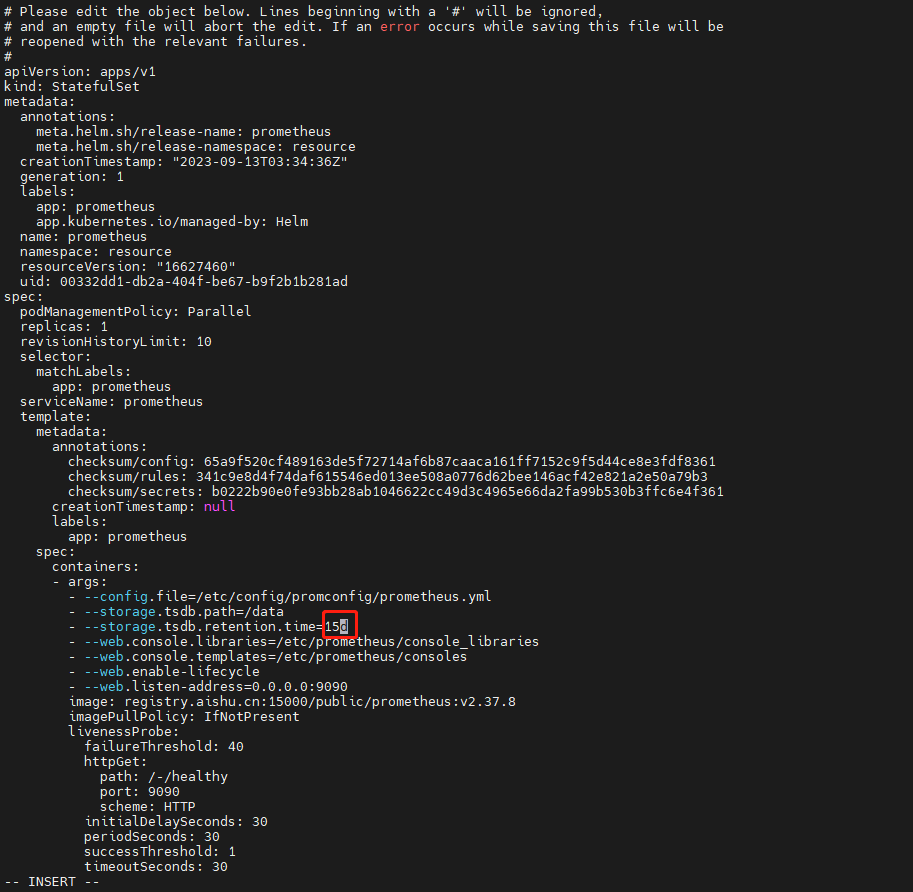
3.按 Esc 退出编辑模式,输入 :wq 保存退出,退出后 Prometheus 容器会自动重新创建,并删除保留时间之外的数据。
注意:该方案为临时性解决方案,空间释放后,请尽快为 AnyRobot 扩容。
更多信息
Prometheus 中存储的数据为 AnyRobot 组件 Grafana 报表所需的数据,缩短 Prometheus 数据保留周期后,Grafana 的 Dashboard 也只能展示步骤 2 中设置的天数之内的数据。